User manual
1. Introduction
Welcome to StarTeam, an online football manager! In games of the football manager genre, you take on the roles of coach and club owner. You need to find the most effective tactical setup, develop, buy and sell players, manage your club budget and other resources wisely, improve the stadium and club infrastructure, and strive for strong results season after season in various tournaments.
After registration you receive a team of 18 players (13 from the country you chose and 5 from other countries), each already with characteristics suited to their position.
Your goal in the game is to win as many games as possible in seasonal official tournaments and earn a respectable place in the rankings.
1.1 Seasons and in-game time
One in-game season (1 year) equals one real calendar month. It starts and ends at 02:00 MSK on the 1st of each month.
When the season changes: players age by one year, retirement is calculated (sec. 2.4), player loans end, team ratings are reset, new official tournaments begin, and so on.
1.2 Referral system
The referral system lets you invite new managers to StarTeam and earn in-game currency for successful invitations. Every user has a unique referral code; on
«My referrals»
you can copy the code or the full registration link with the
ref
parameter — when someone follows that link, the code is filled in automatically. A new user can also enter the code manually on the sign-up form.
Invitee bonus: right after successful registration with a valid referral code, in-game currency is credited to their team's budget in the amount of 100,000 $. The credit is also shown in the club's financial operations.
Referrer reward: after the invited user confirms their email address (in-game account), the referrer receives 50,000 $credited to their team's budget.
The list of referrals and payout status is available on «My referrals» .
When bonuses are not paid:
- the referral code is invalid (including when the referrer has been deleted or blocked).
- An attempt to refer yourself.
- Multi-account protection: the invitee's IP address matches the referrer's IP or network IP.
In these cases in-game bonuses are not paid; explanations for referral status are shown on «My referrals», and you will receive an in-game notification.
1.3 Weather
Feature in development
2. Players
2.1 Player profile
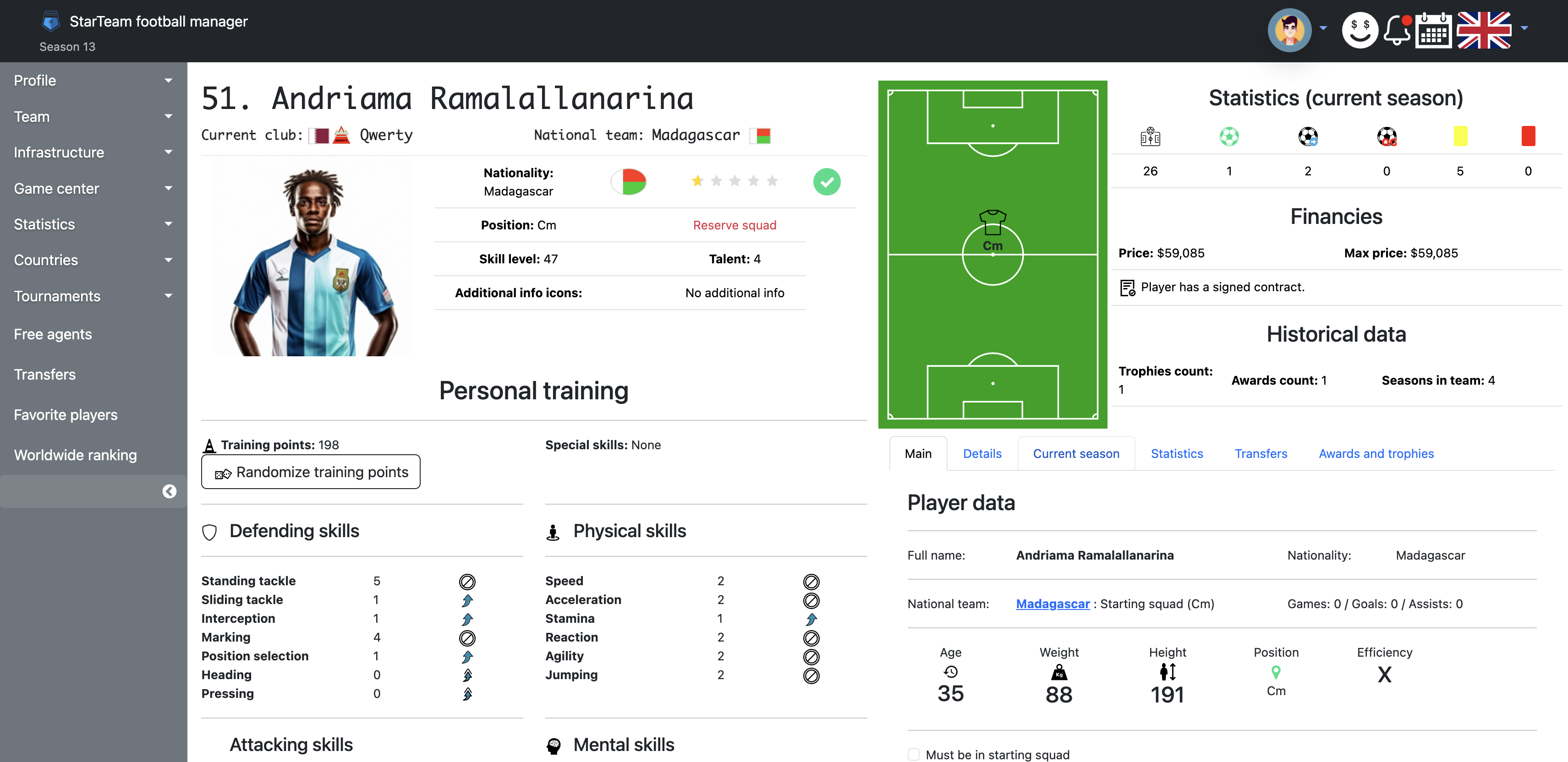
The profile shows player data, physical and in-game parameters, the characteristics block, and various statistics.
On each player's profile you can:
- view basic information (name, country, national team, age, weight, height, position, efficiency on position)
- view characteristics
- view supplementary information (details, season, statistics, transfers, awards)
- (for your own team's players only) available actions: personal training, contract extension, listing for transfer or loan, contract termination and renewal, injury information, renaming for prembs (sec. 2.1.1).
2.1.1. Renaming a player for prembs
For players on your team, the profile has a rename button (edit icon). For 2 prembs you can submit a request for a new name; it is sent for moderation. Prembs are deducted from the team balance when you submit; if the request is rejected, the amount is refunded. While a request for that player is «pending moderation», you cannot submit another.
Enter the new name in the form (up to 50 characters). The system will not accept an empty name, a name identical to the current one, or a name already taken by another player in the game.
Rename rules (must be followed; the administration makes the final decision and may reject a request without giving a reason):
- the new name must stylistically fit the player's country;
- it must not match a real footballer or celebrity;
- it must not contain words that could be seen as offensive;
- it must not contain digits or special characters except hyphens and periods;
- only English letters are allowed;
- the player name must be unique in the game.
2.2 Player talent
Talent is a number from 1 to 9. It sets a coefficient for extra experience gained per game played: the higher the talent, the more points. Talent also affects a player's price on the transfer market.
At the end of each season young players (up to 22) have a chance to improve their talent.
At age 16 the chance is 90%, at 17 — 70%, at 18 — 55%, at 19 — 25%, at 20 — 10%, at 21 — 5%.
2.3 Player positions on the pitch
2.3.1. Position names
A position is shown as a pair of Latin letters — flank or zone and the player's role:
- L — left flank, R — right flank, C — centre of the pitch
- D — defender, M — midfielder, F — forward
For example, LF is a left winger, CD is a centre-back.
Exception: the goalkeeper is shown as GK (short for goalkeeper).
2.3.2. Efficiency coefficient
Position is the player's natural role. Each footballer has a preferred position on the pitch.
Playing out of position substantially lowers effective skill level. The efficiency coefficient is calculated from the matrix below (row — player's position, column — position on the pitch; 1.0 = 100% efficiency, 0.1 = 10% efficiency).
| GK | LD | CD | RD | LM | CM | RM | LF | CF | RF | |
|---|---|---|---|---|---|---|---|---|---|---|
| GK | 1.0 | 0.1 | 0.1 | 0.1 | 0.1 | 0.1 | 0.1 | 0.1 | 0.1 | 0.1 |
| LD | 0.2 | 1.0 | 0.85 | 0.75 | 0.65 | 0.55 | 0.45 | 0.3 | 0.2 | 0.1 |
| CD | 0.2 | 0.85 | 1.0 | 0.85 | 0.5 | 0.65 | 0.5 | 0.2 | 0.3 | 0.2 |
| RD | 0.2 | 0.75 | 0.85 | 1.0 | 0.45 | 0.55 | 0.65 | 0.1 | 0.2 | 0.3 |
| LM | 0.1 | 0.65 | 0.55 | 0.45 | 1.0 | 0.85 | 0.75 | 0.65 | 0.55 | 0.45 |
| CM | 0.1 | 0.5 | 0.65 | 0.5 | 0.85 | 1.0 | 0.85 | 0.5 | 0.65 | 0.5 |
| RM | 0.1 | 0.45 | 0.55 | 0.65 | 0.75 | 0.85 | 1.0 | 0.45 | 0.55 | 0.65 |
| LF | 0.1 | 0.3 | 0.2 | 0.1 | 0.65 | 0.55 | 0.45 | 1.0 | 0.85 | 0.75 |
| CF | 0.1 | 0.2 | 0.3 | 0.2 | 0.5 | 0.65 | 0.5 | 0.85 | 1.0 | 0.85 |
| RF | 0.1 | 0.1 | 0.2 | 0.3 | 0.45 | 0.55 | 0.65 | 0.75 | 0.85 | 1.0 |
2.4 Player age
Age is an important attribute.
A player's age in the game increases by 1 year per season (one real calendar month).
Players over 35 begin to lose characteristics due to age. At 35 they may lose up to 5 skill levels (deducted randomly from characteristics), at 36 — up to 6, at 37 — 8, at 38 — 10, at 39 — 12, at 40 — 14, at 41 — 15, at 42 — 16, at 43 — 18, at 44 — 20.
Players over 35 may announce retirement in the season after the current one. You can offer a contract extension (at least one season) if the player is under 43. The chance of extension depends on the percentage of games played for your team in the current season. A successful extension costs 20% of the player's price.
2.5 Player skill level
Skill level reflects a player's class. It is built from twenty-eight skill (characteristic) levels divided into four groups:
- 1) Defending skills : Standing tackle , Sliding tackle , Interception , Marking , Position selection , Heading , Pressing
- 2) Attacking skills : Shot's accuracy , Shot's power , Balance , Dribbling , Ball control , Short pass , Long pass , Crossing
- 3) Physical skills : Speed , Acceleration , Stamina , Reaction , Agility , Jumping
- 4) Mental skills : Aggression , Creativity , Communication , Leadership , Foresight , Concentration , Composure
Real skill level in the team squad list shows skill level adjusted for the player's position on the pitch.
2.6 Player price
Player price is calculated as: 6.6 × skill level ^ 2 × talent ^ 0.7 × (50 / (15 + age)) ^ 1.9 × national team coefficient. National team players use coefficient 1.1, others — 1.0.
- A player with skill level 101, talent 1, and age 17, not in a national team (coefficient 1.0). Price: 157,197$.
- A player with skill level 82, talent 5, and age 25, in a national team (coefficient 1.1). Price: 230,129$.
Price is recalculated when skill level, age, or talent changes.
Price is decisive when terminating a contract and when re-signing (the fee is 25% of the player's price).
This models the transfer market realistically: star players cost more than average professionals, and young talents have greater potential for price growth.
2.7 Player characteristics
Each characteristic is rated from 0 to 15, where 0 means no skill and 15 is elite world-class level. Below is how these parameters affect a footballer's behaviour on the pitch when in-game moments are calculated.
2.7.1. Defending skills
- RECOMMENDED FOR POSITIONS: defenders (LD, CD, RD), central midfielders (CM).
- ADDITIONAL FOR POSITIONS: wide midfielders (LM, RM) and forwards (LF, CF, RF).
- FOR GOALKEEPER: affects play when coming off the line on set pieces and in one-on-one situations.
- RECOMMENDED FOR POSITIONS: defenders (LD, CD, RD), midfielders (LM, CM, RM).
- ADDITIONAL FOR POSITIONS: forwards (LF, CF, RF).
- FOR GOALKEEPER: affects play in one-on-one situations.
- RECOMMENDED FOR POSITIONS: defenders (LD, CD, RD), midfielders (LM, CM, RM).
- ADDITIONAL FOR POSITIONS: forwards (LF, CF, RF).
- FOR GOALKEEPER: affects play when coming off the line on set pieces and in one-on-one situations.
- RECOMMENDED FOR POSITIONS: defenders (LD, CD, RD).
- ADDITIONAL FOR POSITIONS: midfielders (LM, CM, RM) and forwards (LF, CF, RF).
- FOR GOALKEEPER: affects play when coming off the line on set pieces.
- RECOMMENDED FOR POSITIONS: all positions.
- FOR GOALKEEPER: ability to narrow the shooting angle and take the optimal position on shots from different distances. Affects how easy the ball looks to save.
- RECOMMENDED FOR POSITIONS: defenders (LD, CD, RD), centre forwards (CF).
- ADDITIONAL FOR POSITIONS: midfielders (LM, CM, RM) and wide forwards (LF, RF).
- FOR GOALKEEPER: affects play when coming off the line on set pieces and in one-on-one situations.
- RECOMMENDED FOR POSITIONS: defenders (LD, CD, RD), central midfielders (CM), centre forwards (CF).
- ADDITIONAL FOR POSITIONS: wide midfielders (LM, RM) and wide forwards (LF, RF).
- FOR GOALKEEPER: affects coordination with nearby defenders.
2.7.2. Attacking skills
- RECOMMENDED FOR POSITIONS: forwards (LF, CF, RF).
- ADDITIONAL FOR POSITIONS: defenders (LD, CD, RD), midfielders (LM, CM, RM).
- FOR GOALKEEPER: affects accuracy when starting attacks with hands or feet.
- RECOMMENDED FOR POSITIONS: forwards (LF, CF, RF).
- ADDITIONAL FOR POSITIONS: defenders (LD, CD, RD), midfielders (LM, CM, RM).
- FOR GOALKEEPER: affects how far the ball can be thrown or kicked from hands or open play; helps launch quick counter-attacks.
- RECOMMENDED FOR POSITIONS: all positions.
- FOR GOALKEEPER: affects stability after a jump or collision in a game episode; affects the ability to get up quickly and make a second save (rebound).
- RECOMMENDED FOR POSITIONS: midfielders (LM, CM, RM), forwards (LF, CF, RF).
- ADDITIONAL FOR POSITIONS: defenders (LD, CD, RD).
- FOR GOALKEEPER: has little effect on most moments; when the goalkeeper is outside the box with the ball, it is used like for outfield players.
- RECOMMENDED FOR POSITIONS: midfielders (LM, CM, RM), forwards (LF, CF, RF).
- ADDITIONAL FOR POSITIONS: defenders (LD, CD, RD).
- FOR GOALKEEPER: ability to hold the ball securely ("catch cleanly") after shots. Affects how often opponents score on rebounds.
- RECOMMENDED FOR POSITIONS: midfielders (LM, CM, RM).
- ADDITIONAL FOR POSITIONS: goalkeepers (GK), defenders (LD, CD, RD) and forwards (LF, CF, RF).
- FOR GOALKEEPER: works like the same skill for outfield players.
- RECOMMENDED FOR POSITIONS: all positions.
- FOR GOALKEEPER: works like the same skill for outfield players.
- RECOMMENDED FOR POSITIONS: full-backs (LD, RD), wide midfielders (LM, RM), wide forwards (LF, RF).
- ADDITIONAL FOR POSITIONS: centre-backs (CD), central midfielders (CM), centre forwards (CF).
- FOR GOALKEEPER: affects how actively the goalkeeper comes off the line on crosses into the box.
2.7.3. Physical skills
- RECOMMENDED FOR POSITIONS: all positions.
- FOR GOALKEEPER: maximum running speed. Affects success on one-on-one rushes far from goal and covering for defenders.
- RECOMMENDED FOR POSITIONS: all positions.
- FOR GOALKEEPER: works like the same skill for outfield players.
- RECOMMENDED FOR POSITIONS: all positions.
- FOR GOALKEEPER: works like the same skill for outfield players.
- RECOMMENDED FOR POSITIONS: all positions.
- FOR GOALKEEPER: reaction speed to shots and crosses.
- RECOMMENDED FOR POSITIONS: all positions.
- FOR GOALKEEPER: body coordination in the air, mid-air adjustments, flexibility, and reach for the ball.
- RECOMMENDED FOR POSITIONS: centre-backs (CD), centre forwards (CF).
- ADDITIONAL FOR POSITIONS: full-backs (LD, RD), midfielders (LM, CM, RM), wide forwards (LF, RF).
- FOR GOALKEEPER: jump height and reach.
2.7.4. Mental skills
- ADDITIONAL FOR POSITIONS: all positions.
- FOR GOALKEEPER: tendency for risky rushes and proactive play. High aggression means more interceptions but higher risk of injury, cards, and penalties.
- RECOMMENDED FOR POSITIONS: midfielders (LM, CM, RM), wide forwards (LF, RF).
- ADDITIONAL FOR POSITIONS: defenders (LD, CD, RD), centre forwards (CF).
- FOR GOALKEEPER: unusual choices when starting attacks; sharp through balls that create danger.
- ADDITIONAL FOR POSITIONS: all positions.
- FOR GOALKEEPER: organising defence — instructing defenders, building the wall, and so on.
- RECOMMENDED FOR POSITIONS: all positions.
- FOR GOALKEEPER: works like the same skill for outfield players.
- RECOMMENDED FOR POSITIONS: all positions.
- FOR GOALKEEPER: helps judge direction and power of shots and crosses.
- RECOMMENDED FOR POSITIONS: all positions.
- FOR GOALKEEPER: composure throughout the game and when saving penalties.
- RECOMMENDED FOR POSITIONS: all positions.
- FOR GOALKEEPER: alertness on set pieces and in positional attacks, and when saving penalties.
2.8 Training points
In each game a player earns training points that can be used to improve their skills. The amount of experience gained in a game depends on the following parameters.
For the whole team on the pitch:
- from the game result (win = maximum experience),
- from the game level (less in a friendly game, significantly more in a cup final),
- from goal difference (better difference = more points).
For each player:
- from their talent (the higher, the more experience),
- from their age (optimal training age is 22–26; the older the player, the worse they train),
- from the player's rating (efficiency rating of their actions in the game), shown in the post-game report next to the player's name.
2.9 Training
Training can be done individually or for the whole team at once.
For individual training, go to a player profile on your team. If you have enough training points, you can upgrade one or more levels of one characteristic or use the "Randomize" button.
For mass training, go to the "Team — Training" page. A summary table opens: rows are players, columns are characteristics. To upgrade one or more levels of a selected characteristic for a player, click the arrow next to the current level and confirm.
On this page you can auto-train all players. Click the corresponding button and each player's training points will be distributed randomly; characteristic level and skill level will increase accordingly.
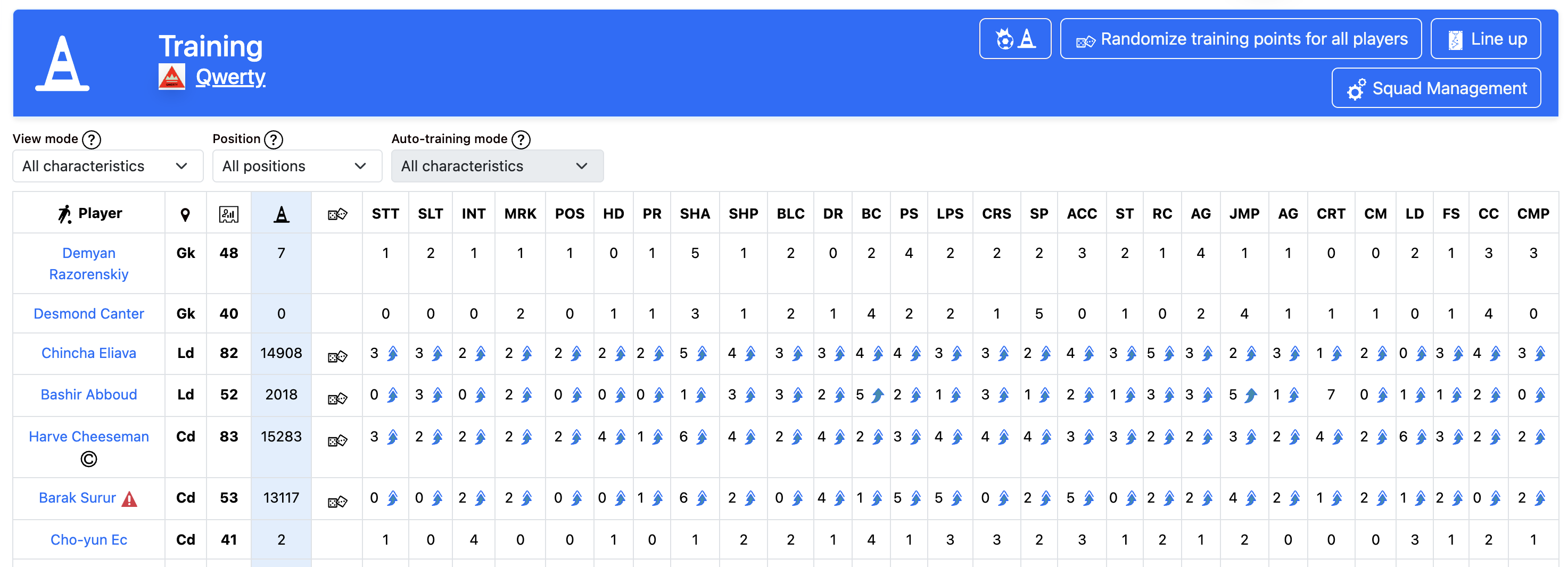
Training table filters
Above the table on the "Team — Training" page (on large screens) there are filters to help you work with the summary table. Your settings are saved and restored on your next visit.
View mode
The "View mode" filter controls how many columns are shown in the table:
- All characteristics — the table shows all 28 skill columns.
- Key characteristics — only skills recommended for the role selected in the "Position" filter are shown (see sec. 2.7).
Position filter
The "Position" filter lets you show only players of a selected role: goalkeepers, defenders, midfielders, or forwards. "All positions" shows the full squad. In "Key characteristics" view mode, this filter also determines which columns are displayed in the table.
Auto-training mode
The "Auto-training mode" filter controls how training points are distributed during random training — via the "Randomize" button for a player or when auto-training the whole team. On mobile devices this filter is shown above the player cards.
- All characteristics — points are distributed randomly across all 28 skills. This mode is available to all managers.
- Key characteristics — points are distributed only across skills recommended for each player's position (see sec. 2.7). Available with an active premium account.
The selected mode is saved together with the other filters. When your premium account expires, the mode automatically reverts to "All characteristics".
2.10. Special abilities
Feature in development
2.11. Free agent market
On the free agent market you can buy players who do not belong to any team.
Player search
The "Players" page has a search form. You can filter by name, country, position, age (from and to), skill level, talent, and price. The "Available for purchase" option shows only players you can buy with your team's current budget.
Results table
Search results show: name, country, position, talent, age, skill level, price, quality. For each player you can: view profile, buy (if budget allows), and add to favorites. Free agents retiring at the end of the season are sold at a 90% discount.
To buy a player you need: a built club base, sufficient team budget, and a free squad slot (within the base limit).
2.12. Transfer market (buying and selling players)
On the transfer market you can buy players from other teams and sell players from your team. The "Transfers" page combines permanent sale and loan listings.
Buying players
The search form lets you filter by name, country, position, offer type (transfer or loan), age, skill level, talent, and price. The "Available for purchase" option shows only offers you can afford. Results show: player, selling team, position, talent, age, skill level, offer price, type (transfer/loan), and status. Click a row or the go button to open the offer page and complete the purchase.
Selling players
To list a player for transfer, go to your team squad or the player profile and click "List for transfer". Permanent transfer price can be set from 50% to 200% of the player's value. Injured, suspended, and loaned players cannot be listed. You can have at most 3 active transfers at once (5 with a premium subscription). Your team must have at least 15 players to list anyone for sale.
After purchase the amount is deducted from your balance and credited to the seller immediately. The deal cannot be cancelled.
2.13. Transfer market (player loans)
A loan lets you temporarily get a player from another team until the end of the current season.
How loans work
The loan price is fixed at 10% of the player's value. The loan runs until the end of the season. When the season changes, the loaned player automatically returns to the owning team.
Offering a loan
To loan out a player, choose "Offer loan" in the team squad or player profile. The price is filled in automatically. A loaned player cannot be listed for transfer or loan again.
Finding loans
On the "Transfers" page, set the "Transfer type" filter to "Loan" to see loan offers only. Status "Active" means the offer is available for purchase; "Active loan" means the player is already on loan and will return at the end of the season.
2.14. Contract termination
Contract termination lets you part with a player early and free a squad slot. After termination the player becomes a free agent and can be bought by any team, including yours.
Cost
Contract termination costs 25% of the player's current value (sec. 2.6). The amount is deducted from the team budget.
How to terminate
The "Contract termination" button is available in the team squad and on the player profile. The amount to be charged is shown before you confirm.
Restrictions
You cannot terminate a contract if:
- the team is at the minimum number of players (14)
- there are insufficient funds in the account
- the player is injured or suspended
- the player is on loan
- the player has announced retirement at the end of the season. The termination button is not shown for players who have already declined a contract extension and are retiring.
After termination the player is automatically removed from the team squad and tournaments (if they were participating).
If the player was in the starting lineup, a substitute is selected automatically for their slot — by position or highest skill level.
3. Team
3.1 Team squad
The team page is your team's main profile. It shows the logo, name, key metrics, and the full player list.
Key metrics
The page header shows: starting lineup strength, overall team strength, number of fans, and world ranking (with a link to details). For your own team you can change the logo by clicking the pencil icon.
Navigation buttons
- Current league — go to the tournament your team is in. This button appears only for teams participating in official tournaments.
- Player statistics — statistics for your team's players (sec. 3.5).
- Team statistics — overall team statistics (sec. 3.4).
- Records — team records (sec. 3.6).
- Trophy Room — trophies won (sec. 3.7).
- Hall of Fame — top scorers, assist providers, and appearance record holders (sec. 3.8).
- Share — share a link to the team profile on social networks.
For your own team you also have: "Edit" (team name), "Go to stadium creation", "Go to club base creation" — if the stadium or base has not been built yet. For another team's page — "Head-to-head history".
Info cards
Below are cards for: team owner (login, country), stadium (level, capacity), club base (level, number of players, training fields), budget (and sponsor if any). Click the budget to open financial reports (section 7).
Player table
For each player the table shows: number, name, country, position, talent, age, skill level, price, quality, status (starter/substitute). The table can be sorted by column. At the bottom — totals: player count, averages, total strength, and full team value.
For your own team: you can change a number by clicking it. In the actions column: view profile, list for transfer, offer loan, extend contract (if applicable), terminate contract. For another team — add to favorites.
3.2 Line up and squad selection
The "Line up and squad selection" page lets you set the team's tactical formation, assign players to positions, and choose the captain.
Header buttons
- Squad Management — go to settings for mandatory starting players and the captain.
- Training — go to player training.
Tactical pitch and substitutes
The pitch shows the current lineup: 11 starting players by position (goalkeeper, defenders, midfielders, forwards). Substitutes are on the right. Players who cannot take the field (injured, suspended) appear in the "Unavailable players" block.
Changing formation
In the dropdown, choose a tactical formation (for example, 4-4-2, 4-3-3) and click "Confirm". The formation sets how many players play in each position.
Substitutions (drag and drop)
You can swap players by dragging: drag a player from the pitch to another position or to a substitute — they swap places. On mobile devices, tap players in turn instead of dragging; they will swap automatically. Unavailable players (injured, carded) cannot be dragged.
Team captain
In the dropdown, choose the team captain and click "Confirm".
3.3 Squad Management
The "Squad Management" page lets you set who must be in the starting lineup, choose the team captain, assign penalty takers, and configure position-based automatic substitutions.
Header buttons
- Line up — go to tactical lineup (formation, game-day squad).
- Training — go to player training (improving characteristics with training points).
Substitutions by position
The page has a "Substitute players by position" checkbox. It is off by default. Your choice is saved automatically.
When enabled: automatic replacements (injury, suspension, dismissal, completed transfer) prefer a reserve player with the same role as the vacated slot on the pitch. If none is available, the best-suited substitute by skill is chosen from the available reserves. The same logic applies to injury substitutions during a match.
When disabled: automatic replacements pick the substitute with the best skill for the position, regardless of role.
This setting does not affect substitutions after a red card during a match.
Players who must start
For each position (goalkeeper, defenders, midfielders, forwards) you can pick one player who is automatically included in the starting lineup when the team is set for a game — if available (not injured, etc.).
For each position the options are: "Not selected" or one of the players in that position.
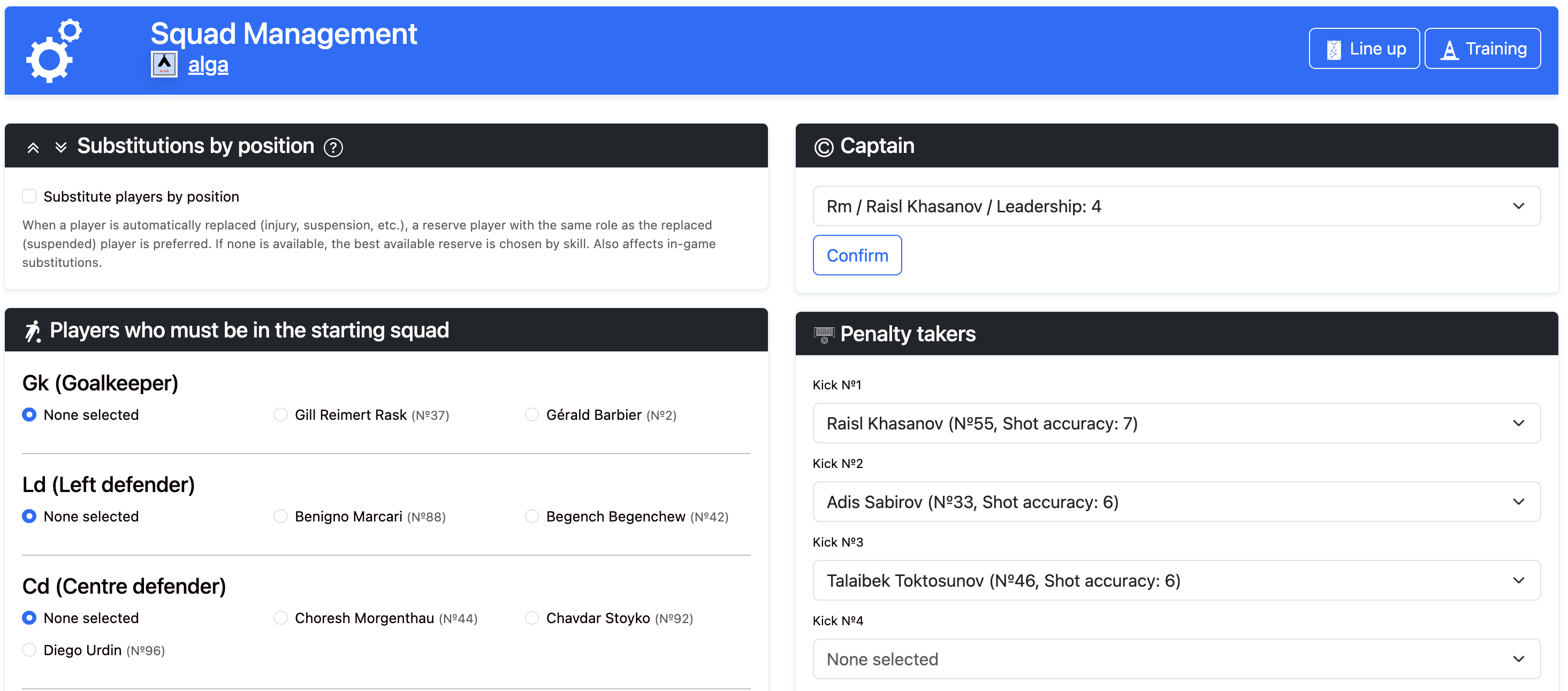
Only one player per position can be chosen. Your choice is saved automatically.
Team captain
In the dropdown, choose the player who will be team captain. Players are sorted by leadership (highest first). For each you see position, name, and leadership value. Click "Confirm" to save.
Penalty takers
You can set 5 penalty takers in order (1st, 2nd, 3rd, 4th, 5th). Your choice is saved automatically.
Penalties in a game: if the referee awards an 11-metre kick for a foul in the box, the first of your penalty takers who is on the pitch in the starting lineup at that moment takes it. If none are set or none are in the lineup — a random player is chosen.
Penalty shootout: in a post-game shootout the first 5 kicks are taken by your chosen penalty takers (in the set order), but only those on the pitch. The 6th and later kicks (sudden death) are taken by the remaining players.
3.4 Team statistics
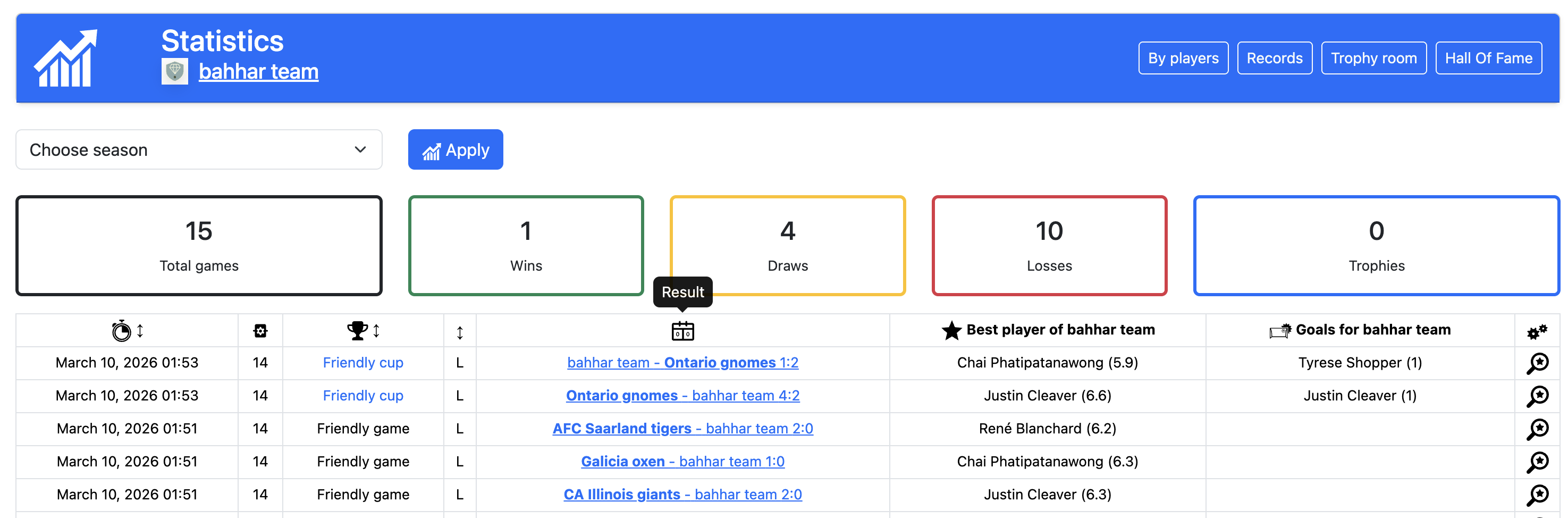
The "Team statistics" page shows overall team metrics and a list of games for the selected season.
In the filter form, choose a season and click "Apply".
Cards show: total games, wins, draws, losses, and trophies. Below — a games table: date, season, tournament, result, best player, goal scorers, link to view the game. The table can be sorted. With many games, pagination is available. The header has buttons to player statistics, records, Trophy Room, and Hall of Fame.
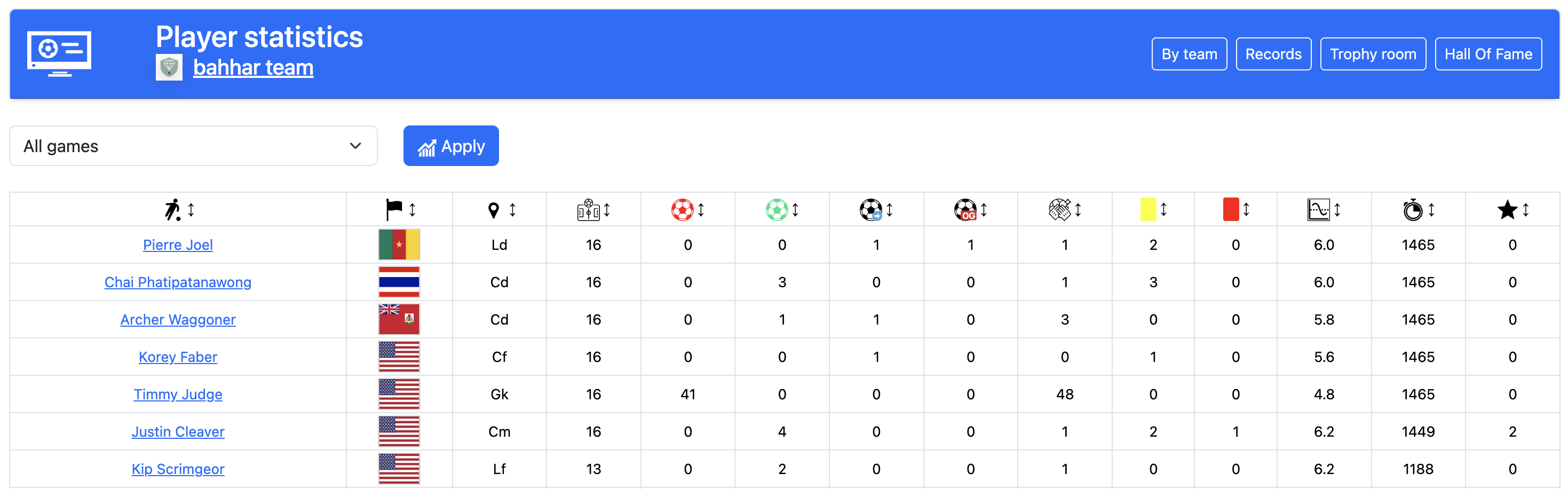
3.5 Player statistics
The "Player statistics" page shows a table of individual player statistics for the selected game type.
In the filter form, choose the statistics type: league, cup, friendly games, etc. — and click "Apply".
For each player the table shows: name, country, position, games, goals conceded, goals, assists, own goals, saves, yellow and red cards, average rating, minutes played, player of the game awards. The table can be sorted by column. The header has buttons to team statistics, records, Trophy Room, and Hall of Fame.
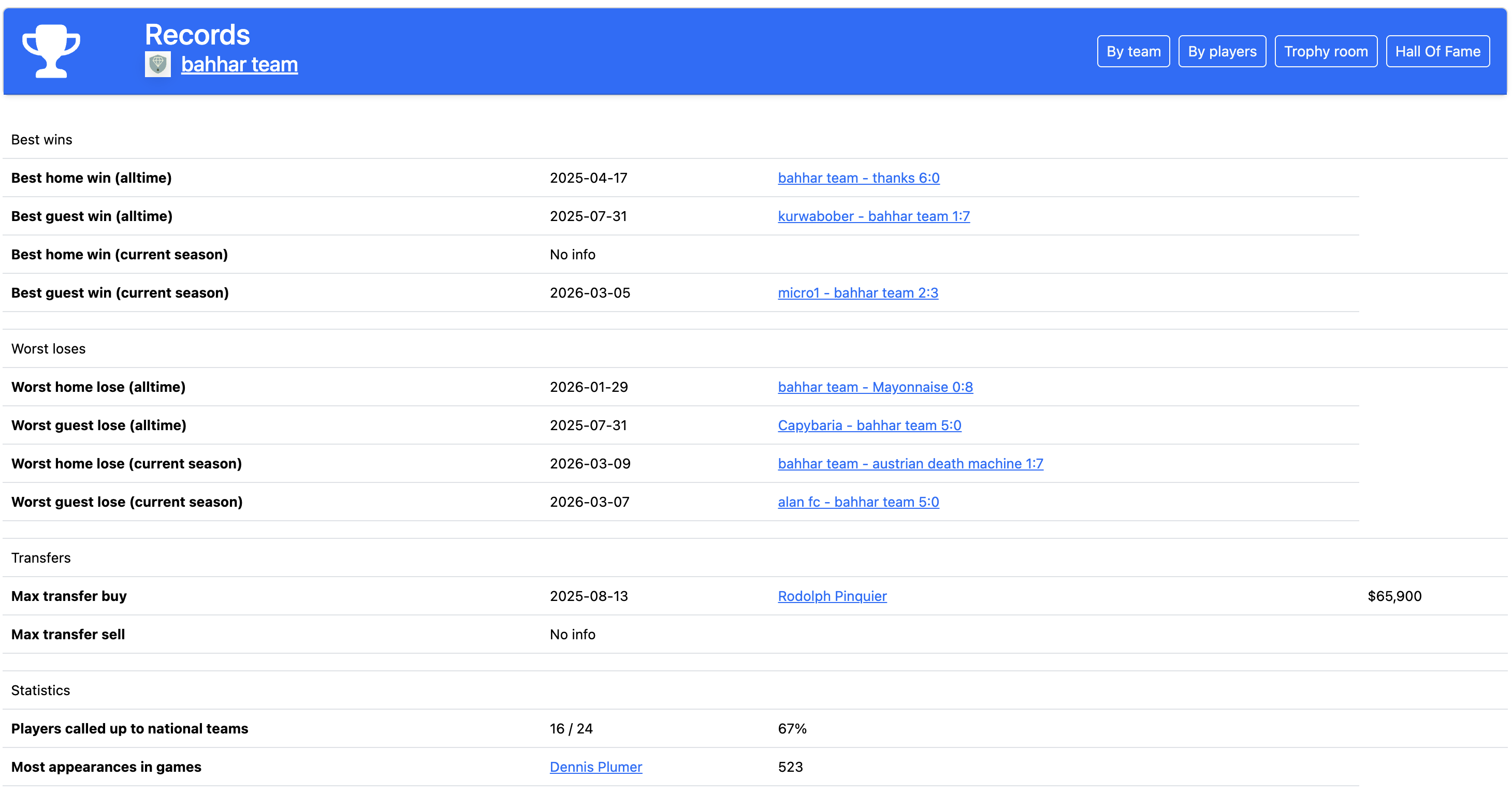
3.6 Records
The "Records" page lists team records for all time.
"Best wins": biggest home and away wins of all time and in the current season. "Worst defeats": biggest home and away losses of all time and in the current season.
For club teams: "Transfers" — biggest purchase and biggest sale of a player.
"Statistics": national team call-ups (from the club), appearance record for the club, for official games, top scorer (overall and in official games), top assist provider (overall and in official games). Some records appear after official games are played. The header has buttons to team statistics, player statistics, Trophy Room, and Hall of Fame.
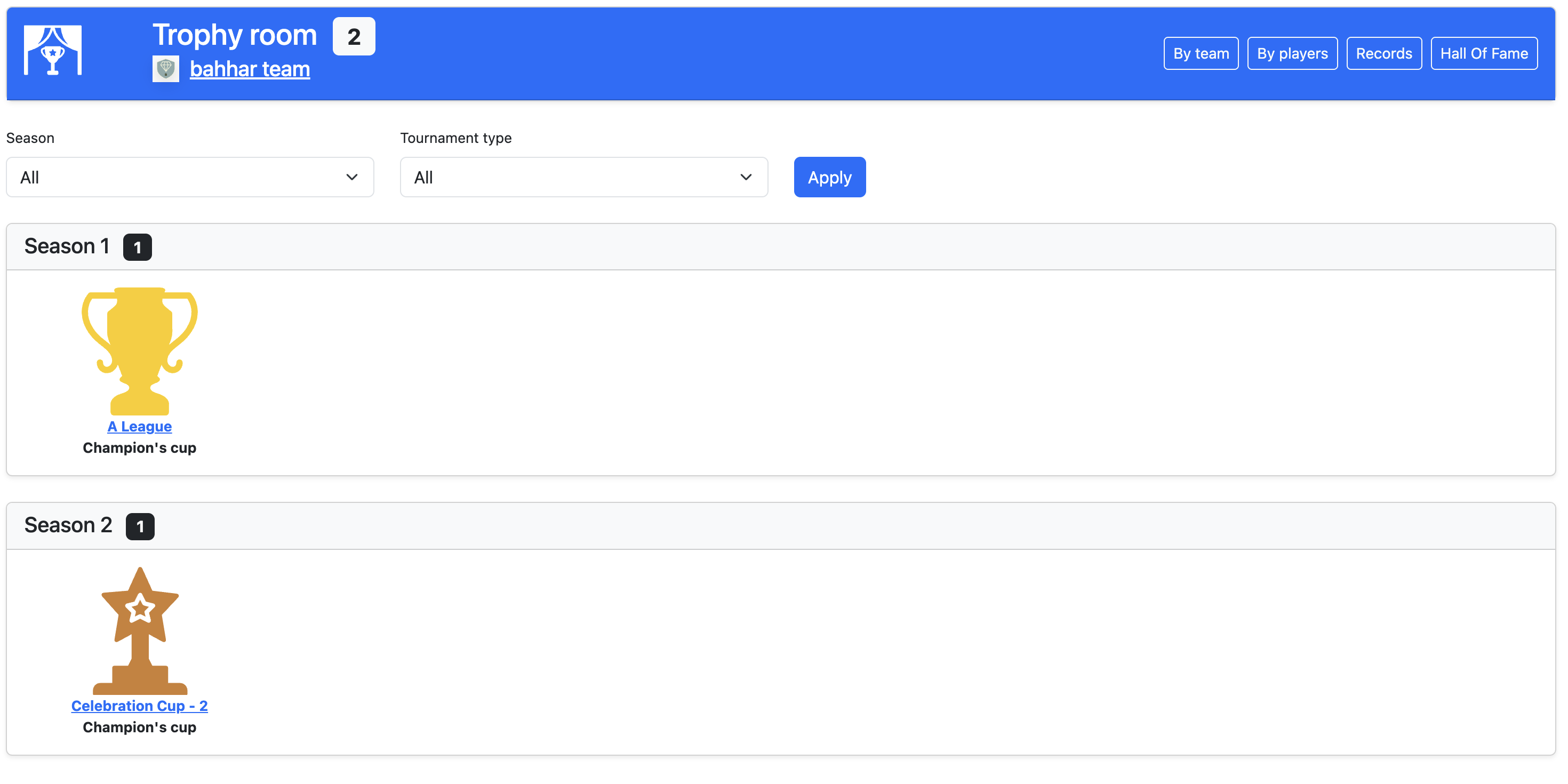
3.7 Trophy Room
The "Trophy Room" page shows all trophies won by the team.
In the filter you can choose season and tournament type (all, friendly, official) and click "Apply".
Trophies are grouped by season. For each trophy: icon, tournament name, and award name. If there are no trophies yet, a message is shown. The header has buttons to team statistics, player statistics, records, and Hall of Fame.
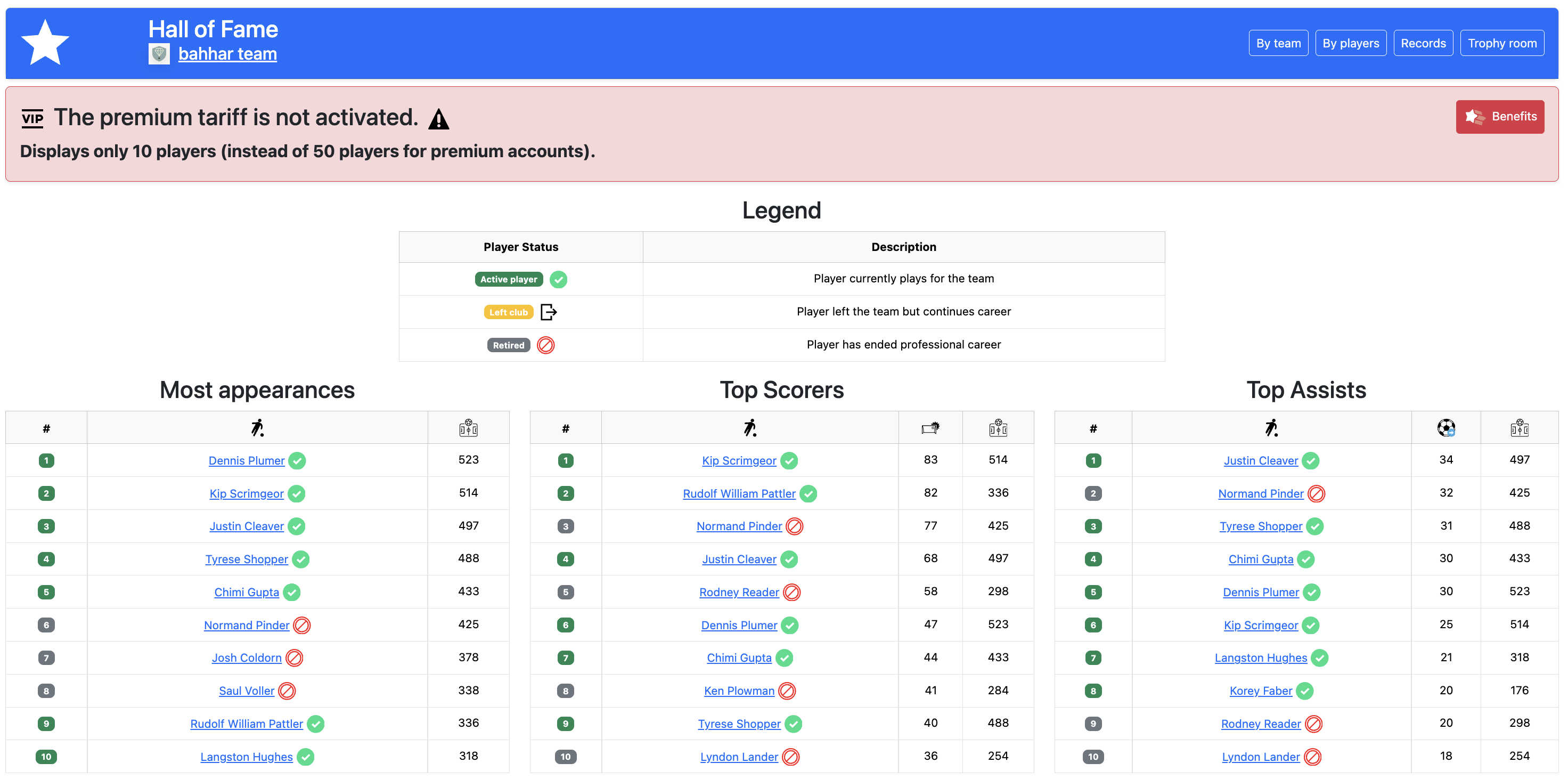
3.8 Hall of Fame
The "Hall of Fame" page shows the team's best players in three categories: most appearances, top scorers, top assist providers.
For each category — a ranking table: place, player name (linked to profile), the relevant stat, and number of games. Next to the name — player status: current (in the squad), left the club, or retired.
For regular accounts a limited number of players is shown in each category (10). For premium accounts, 5 times more (50). The header has buttons to team statistics, player statistics, records, and Trophy Room.
3.9 National teams
A national team represents a country. It does not replace your club squad: players still play for their clubs in leagues and cups, and in national team games they represent their country's national team.
Each national team's squad is rebuilt once per season — when the season changes (see sec. 1.1). The system automatically selects the best available players from that country by position and builds the squad according to the national team's formation. A player's national team status is shown on their profile; players called up to the national team are valued with a higher coefficient (sec. 2.6).
Where to view national teams
- on the country page — "National team" tab (squad, strength, links to Elo rating and national teams world ranking);
- «National team tournaments» — current season tournaments;
- «National teams world ranking» — table of national team strength.
Four-season national team tournament cycle
National team tournaments follow the in-game calendar and repeat in a cycle of four seasons (four in-game months), similar to real football: continental qualifiers → continental championships → World Cup qualifiers → World Cup. Which stage falls in the current season is determined by the season number in the game.
- 1st season of the cycle — continental championship qualifiers (Europe, North America, and other confederations).
- 2nd season of the cycle — continental championships (for example, European Championship, North American Championship, etc.).
- 3rd season of the cycle — World Cup qualifiers (group stages by continent).
- 4th season of the cycle — World Cup: group stage (12 groups) and knockout play-offs.
In other calendar months club tournaments (leagues, cups) continue as usual; national team games are played within the corresponding seasonal tournament and count in separate statistics and the national teams world ranking.
4. Games
4.1 Friendly games
To play a friendly game, submit a request on Game center — Friendly games, or accept any existing request on that page.
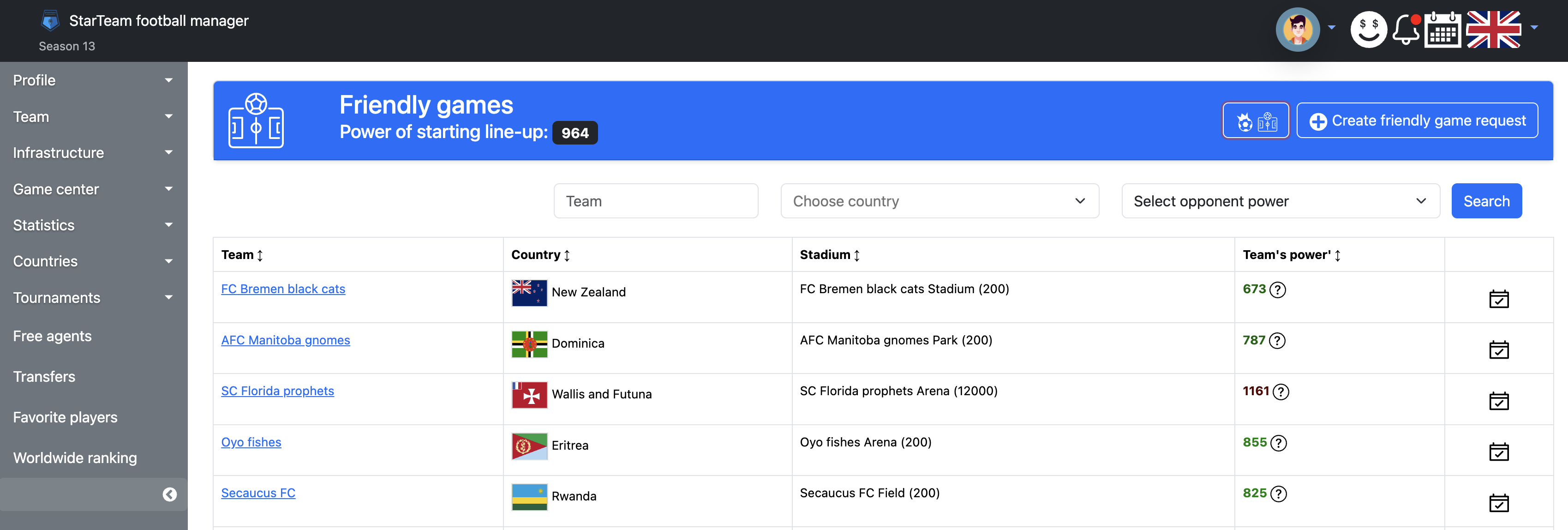
After clicking the "Play friendly game" action button, the game will be played. Example:
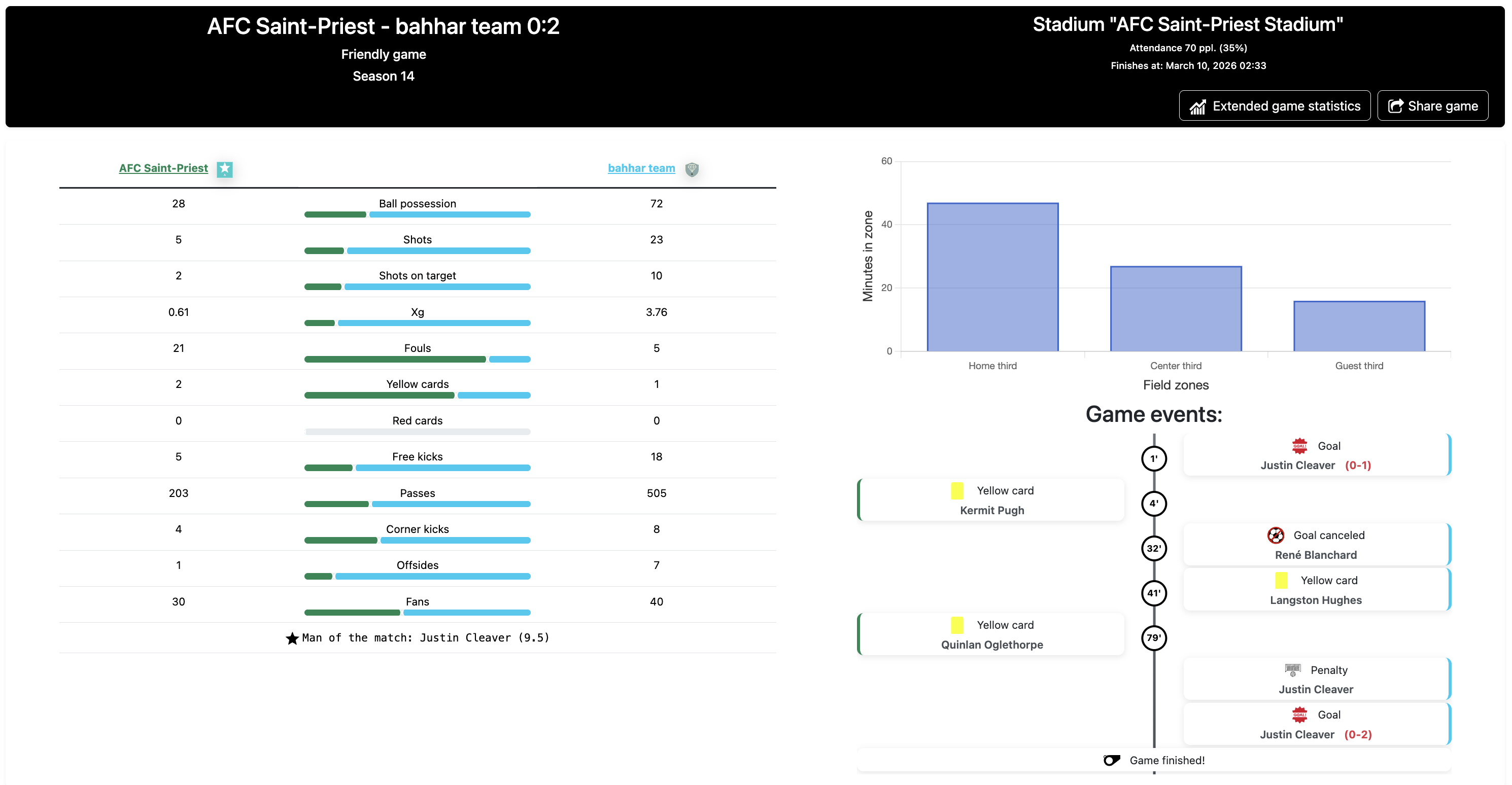
4.2 Tournament games
Tournament games are played automatically at the scheduled time. Unlike friendly games, you cannot play them on demand — the system runs the game when kick-off time arrives.
Tournament participation
Participation depends on the tournament type (section 6):
- Leagues (sec. 6.4) and Cups (sec. 6.5) — all teams that meet the requirements start automatically at the beginning of the season.
- Friendly tournaments (sec. 6.2) — click "Join" on the tournament page.
- Newbies League (sec. 6.3) — all new (recently registered) teams and teams whose managers recently returned to the game start automatically.
Calendar and schedule
The game schedule is shown in the calendar (Game center — Game calendar). You can switch between upcoming and past games. Game types are marked in different colours (legend — button on the calendar page). Kick-off time is shown in MSK (UTC+3).
Viewing a game
The game page shows teams, score, tournament, season, stadium. Before kick-off — start time. After full time — statistics (possession, shots, goals, etc.), link to detailed player statistics. If a team was not ready (for example, fewer than 11 available starting players), a technical defeat is recorded.
4.3 Extended game statistics
Extended statistics let you analyse each team's and each player's performance in a game in detail. They are available via the "Extended game statistics" link on a finished game page.
The page shows both teams (home and away) with squads and formations. In the summary for each player: position, goals, assists, own goals, yellow and red cards, injuries, minutes played, rating. The player of the game is marked with a star and highlighted.
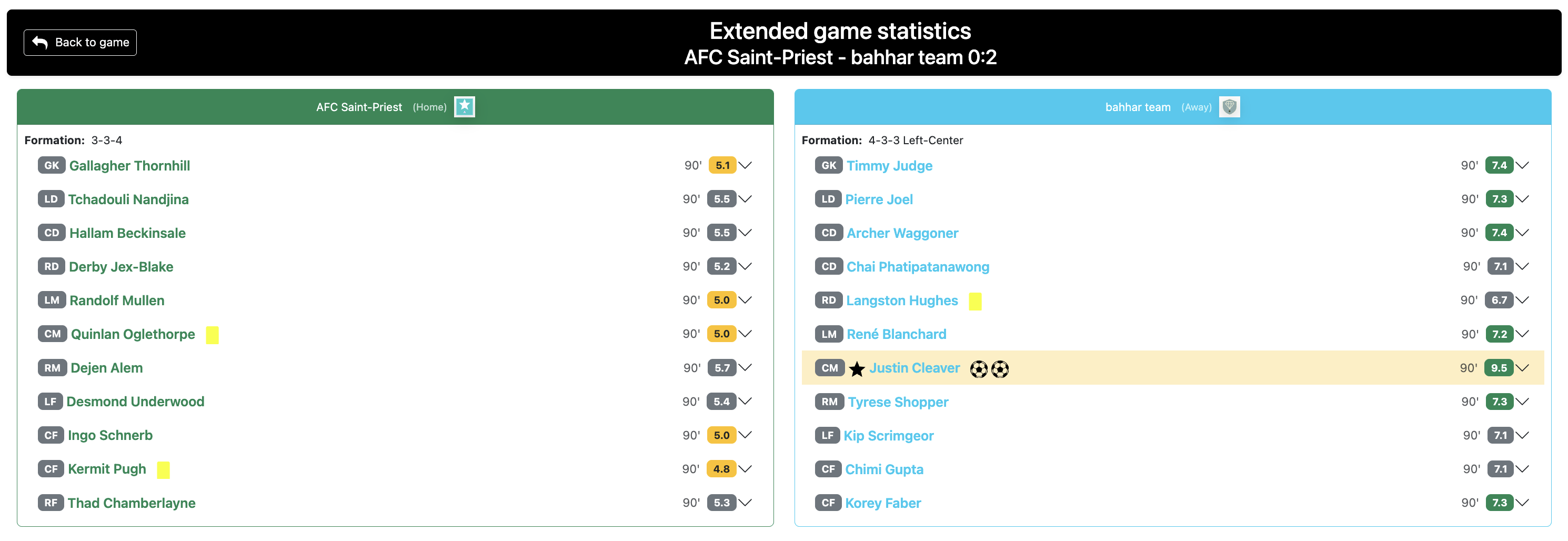
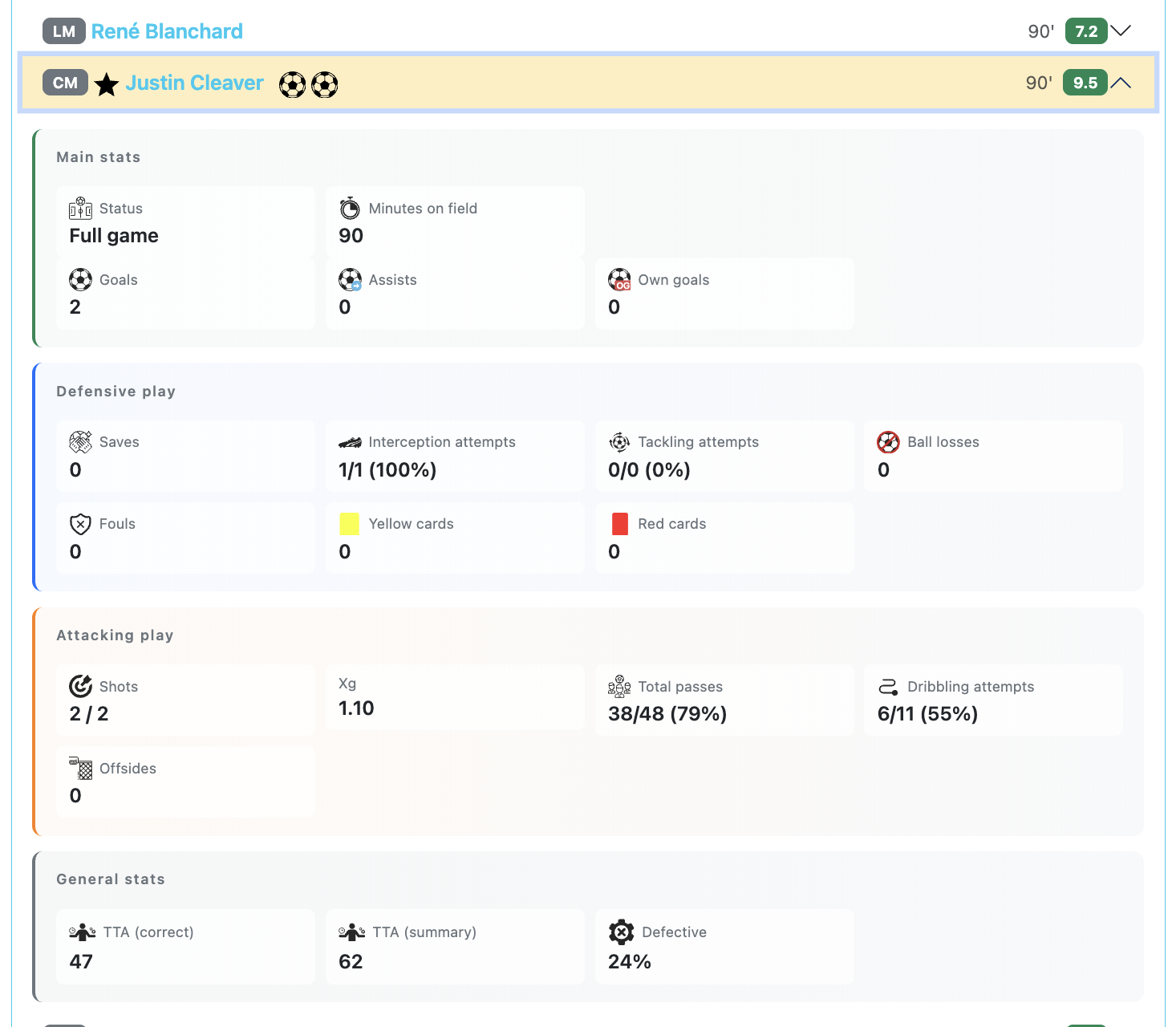
Expanding a player card shows detailed statistics in four blocks:
- Basic data — entry status, minutes, goals, assists, own goals
- Defensive play — saves, goals conceded (goalkeepers only), interceptions, tackles, ball losses, fouls, cards
- Attacking play — shots (on target / total), xG, passes, dribbling, offsides
- General data — technical-tactical actions (successful, total, error percentage)
5. Infrastructure
Team infrastructure includes the stadium and club base (training fields, infirmary, and medkit and tool production). Without a stadium you cannot enter tournaments; stadium capacity and level affect match-day income.
The club base includes the training center (sets how many players the club can have), training fields (bonus to training points earned), medical center (reduces injury chance in games), medkit production, and technical center.
Medkits and tools accumulate at the base and are spent on treating injured players in the infirmary and upgrading training fields respectively.
Read more about all club infrastructure below.
5.1 Stadium
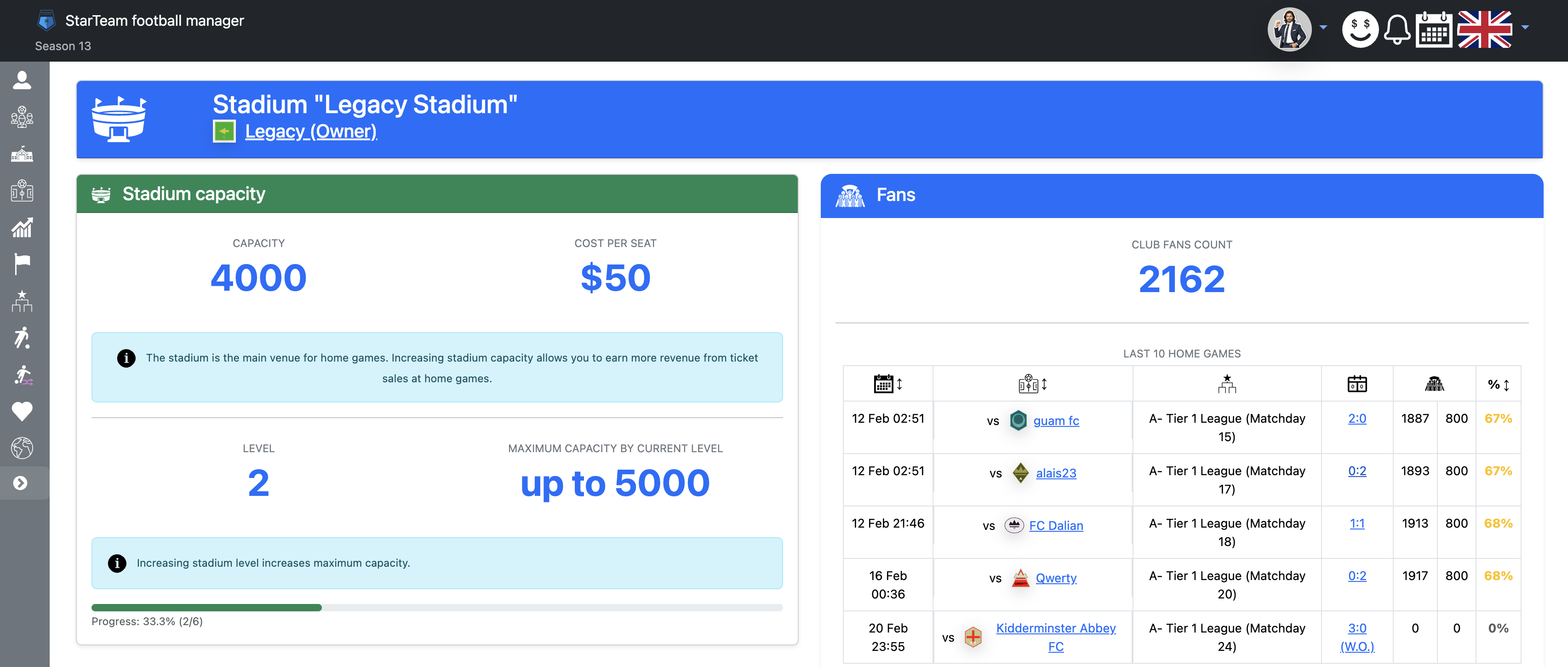
The stadium is the main venue for home games. Ticket revenue depends on attendance, stadium level, tournament type, and service costs. Open Help for the full calculation.
You can increase stadium capacity to earn more from ticket sales at home games. Raising stadium level is also required from time to time to increase capacity. For example, to go from 900 to 1,200 seats, first expand the stadium to 1,000 seats, then raise the level to 2, and only then increase capacity to 1,200.
Stadium capacity levels:
- Level 1 (default) — 200 to 1,000 seats
- Level 2 — 1,001 to 5,000 seats
- Level 3 — 5,001 to 20,000 seats
- Level 4 — 20,001 to 50,000 seats
- Level 5 — 50,001 to 75,000 seats
- Level 6 (maximum) — 75,001 to 100,000 seats
Fan attendance depends on game type (official games draw more spectators than friendlies and friendly cups — both use attendance coefficient 0.3), whether teams are from the same continent (if not — away fans are reduced by 50%), and demand (if your team has 200 fans or fewer, all of them can attend).
Ticket income is credited only from your own fans who attended the match. Revenue is no longer equal to «1 coin per fan» for most teams — it is calculated as follows:
- Base ticket price = seat expansion cost ÷ 100 (depends on stadium level)
- Effective attendance — your fans at the match; above 70% stadium fill each extra fan brings less income
- Tournament price coefficient — from 0.1 for friendlies and friendly cups to 1.0 for top international tournaments
- At home: 5–30% stadium service fee deducted from your ticket revenue (by level)
- Away: income from your traveling fans only, ticket price × 0.7 (away section is cheaper than home stands)
- Minimum ticket revenue per match is 100 $
- New teams in their first season with up to 200 fans receive 1 coin per attending fan on all match types
Sponsor prizes for league and cup games are added on top of ticket revenue.
5.2 Club base — Training center
Extension of your club's base will help increase the maximum number of players in your team
Training center levels set the maximum number of players in the team:
- Level 1 (default after building the base) — up to 20 players, free
- Level 2 — up to 22 players, $100,000 and 2 tools
- Level 3 — up to 24 players, $500,000 and 10 tools
- Level 4 — up to 26 players, $1,000,000 and 20 tools
- Level 5 — up to 30 players, $1,500,000 and 30 tools
- Level 6 (maximum) — up to 33 players, $2,500,000 and 50 tools
5.3 Club base — Training fields
Building of training fields will increase the training points your players gain in games
Training field levels, training points bonus, and cost in in-game currency and tools:
- Level 1 — no bonus, free
- Level 2 — +5% training points, $250,000 and 5 tools
- Level 3 — +10%, $750,000 and 15 tools
- Level 4 — +15%, $1,000,000 and 30 tools
- Level 5 — +20%, $1,500,000 and 50 tools
- Level 6 (maximum) — +25%, $2,000,000 and 75 tools
5.4 Club base — Medical center
The medical center will help reduce the chance of players injuries
Medical center levels (injury probability reduction) and cost in in-game currency and tools:
- 1 — 2% ($100,000, 2 tools)
- 2 — 5% ($250,000, 5 tools)
- 3 — 7% ($250,000, 5 tools)
- 4 — 10% ($350,000, 7 tools)
- 5 — 12% ($350,000, 7 tools)
- 6 — 15% ($500,000, 10 tools)
- 7 — 17% ($500,000, 10 tools)
- 8 (maximum) — 20% ($500,000, 10 tools)
5.5 Club base — Medkit production
The medkit production produces medkits, which are needed for treatment of players injuries
Medkit production levels and cost in in-game currency and tools:
- 1 — 1 medkit every 120 h ($100,000, 2 tools)
- 2 — 1 medkit every 96 h ($250,000, 5 tools)
- 3 — 1 medkit every 72 h ($250,000, 5 tools)
- 4 — 2 medkits every 120 h ($250,000, 5 tools)
- 5 — 2 medkits every 96 h ($250,000, 10 tools)
- 6 (maximum) — 2 medkits every 72 h ($250,000, 10 tools)
Medkits are spent on treating injuries in the infirmary or on the player profile.
5.6 Club base — Technical center
The technical center produces tools, which are needed for any construction
Tool production levels:
- 1 — 1 tool every 96 h ($100,000, 2 tools)
- 2 — 2 tools every 120 h ($250,000, 5 tools)
- 3 — 2 tools every 96 h ($250,000, 5 tools)
- 4 — 2 tools every 72 h ($250,000, 5 tools)
- 5 — 3 tools every 96 h ($250,000, 10 tools)
- 6 (maximum) — 3 tools every 72 h ($250,000, 10 tools)
Tools are required for any construction and upgrades at the base and stadium.
5.7 Infirmary
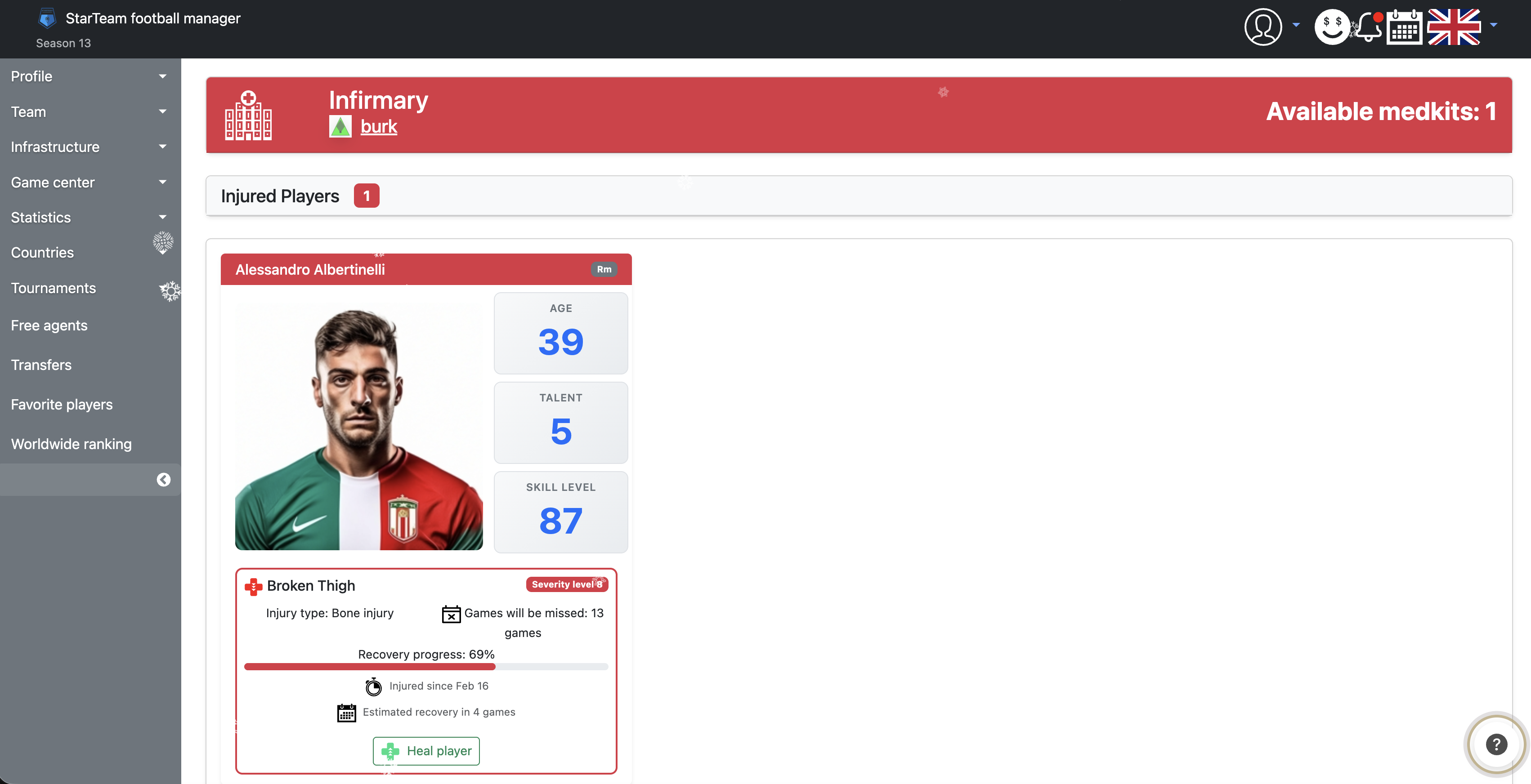
The infirmary page lists all currently injured players on your team. If you have medkits, you can treat them: on the player card click "Treat player", in the modal choose the number of medkits (with the slider). An injury can be healed fully or partly; full recovery makes the player available for the starting lineup immediately. The card shows age, talent, skill level, and injury details (type, severity, games missed). Any injury can be healed instantly for 2 prembs.
5.8 Injury history
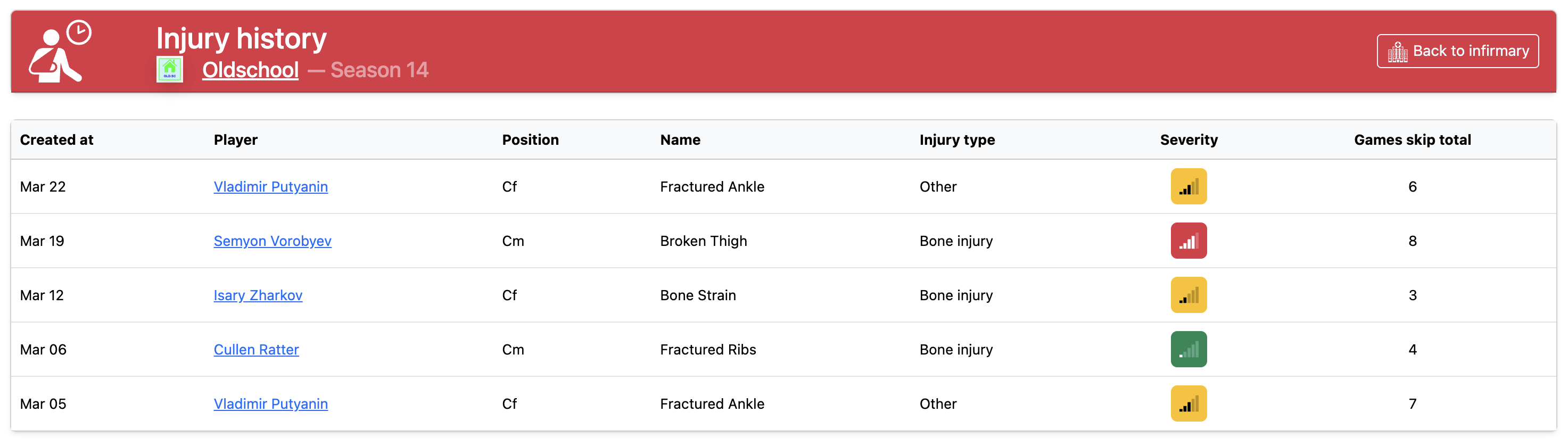
The "Injury history" page lists all injuries and illnesses for your team's players for the current season (most recent first). Open it from the infirmary header — the button with a clock icon labelled "History".
For each entry the table shows:
- date the injury was recorded;
- player (name linked to profile) and position;
- injury name and type (bone, muscle, ligament, illness, etc.);
- severity indicator as a coloured level-bar icon;
- number of games missed until recovery.
Green badge means a relatively mild injury or short absence; yellow — moderate severity or a moderate number of games out; red — serious injury or long recovery.
6. Tournaments
6.1 General information
For all tournaments, a player suspension — red card (direct or two yellows) and excess yellow cards (in multiples of 4) — is CROSS-TOURNAMENT and applies to all other tournaments, so it affects player availability for several upcoming team games. Friendly games do not clear suspensions.
During a tournament players can get injured. An injury is measured in the number of games needed to recover.
6.1.1. Individual player awards for a tournament
When a tournament ends (all games played and final trophies awarded), individual awards are given separately to the best players in several categories. Only completed games in that tournament count; a player must have played at least 1 game in the tournament.
Personal award categories: top scorer (goals), top assist provider (assists), player of the tournament (by average game rating), best goalkeeper (lowest average goals conceded per game among goalkeepers), best young player (age 21 or under).
Minimum games played to compete for an award:
- for "player of the tournament" and "best goalkeeper" — at least half of the games played in the tournament (rounded down)
- for "top scorer" and "top assist provider" — at least one game in the tournament is enough.
Tie-breakers when stats are equal (multiple winners):
- for "top scorer" and "top assist provider" — if goals or assists are equal, the award goes to players with the same stat and the fewest games in the tournament (all else equal — whoever achieved it in fewer games).
- for "player of the tournament" — highest average rating (to two decimal places); if equal — whoever played more games among those tied.
- for "best goalkeeper" — lowest average goals conceded per game; if equal — more games played among goalkeepers with the same stat.
Best young player: first chosen among young players (21 or under) who played at least half the games in the tournament (rounded down), with the highest average rating (if equal — more games in the tournament). If none — among young players from the top scorers list (more goals; if equal — more games in the tournament). If still none — by number of "player of the game" awards (if equal — more games in the tournament).
Winners in these categories also receive training points; the amount depends on tournament type (league, cup, division, etc.).
6.2 Friendly tournaments
Taking part in friendly tournaments, which run several times a day, is an important part of the game. To register, click [Join] on the "Friendly tournaments" page or on the tournament page. These tournaments start every 30 minutes. If the minimum number of teams is not reached, bot teams are added instead of real participants.
They start every half hour and are limited by participating team strength (expected starting lineup strength — sum of all players' skill levels divided by player count and multiplied by 11).
All user teams (except excluded, deleted, or blocked) can enter. If there are not enough real teams, bots are added.
This tournament type uses a knockout format: teams are paired and play 2 games (home and away). The winner on aggregate advances; the loser is eliminated.
- To win you must score more goals than your opponent over the two games.
- If the two games end level, extra time applies — two 15-minute halves.
- If still level — a penalty shootout, with alternating kicks from 11 metres (5 each). If still level after 5 each, sudden death until one scores and the other misses.
All participating teams receive prize money (depending on how far they progress); the winner gets a commemorative trophy.
6.3 Newbies League
If a team registers in StarTeam before the 25th of each month, on one of the following days it is added to a "Newbies League" tournament. The competition runs until the end of the month and has 8 to 16 teams.
This tournament type is played in 2 rounds: 2 games against each opponent home and away (minimum 14 games per team, maximum 30).
These tournaments have no complex structure (Newbies Leagues are not linked), so teams are not relegated to lower divisions or promoted to higher ones for finishing first.
All participating teams receive prize money — the higher the table position, the more. The winning team and prize-winners also get commemorative cups, and their players receive medals.
Next season all Newbies League participants are placed in various league divisions.
6.4 Leagues
At the start of each season official League tournaments begin. A league system from top to amateur division reflects team achievements. The competition runs until the end of the month and has 8 to 20 teams.
This tournament type is played in 2 rounds: 2 games against each opponent home and away.
All user teams (except excluded, deleted, or blocked) enter automatically. If there are not enough real teams, bots are added to league divisions (for at least 1 season).
Teams that already played in a League continue in one division on sporting merit: based on the previous season, a team may stay, move up a division, or drop down.
New teams (registered in StarTeam in the previous month) may be placed in divisions automatically (if slots are free), replace bot teams, or form a new league division.
All participating teams receive prize money — the higher the table position, the more. The winning team and prize-winners also get commemorative cups, and their players receive medals.
6.5 Cups
At the start of each season official Cup tournaments begin.
All user teams (except excluded, deleted, or blocked) enter automatically. If there are not enough real teams, bots are added to cup tournaments.
This tournament type uses a knockout format: teams are paired and play 2 games (home and away). The winner on aggregate advances; the loser is eliminated.
- To win you must score more goals than your opponent over the two games.
- If the two games end level, extra time applies — two 15-minute halves.
- If still level — a penalty shootout, with alternating kicks from 11 metres (5 each). If still level after 5 each, sudden death until one scores and the other misses.
All participating teams receive prize money (depending on how far they progress); the winner gets a commemorative trophy.
6.6 Continental cups
Feature in development
6.7 National team tournaments
National team tournaments are official competitions for national teams. They follow the season calendar and do not require separate registration from a club manager: national teams with a full enough squad (at least 15 players in the squad when the tournament is formed) take part.
General information on national teams, squad selection, and the four-season cycle (continental qualifiers → continental championships → World Cup qualifiers → World Cup) — in sec. 3.9. The list of current season tournaments — on the «National team tournaments» page.
General rules
- national team games are played automatically at the scheduled time, like other tournament games (sec. 4.2);
- in national team games, players from that squad represent their country; game statistics and awards show the national team, not the club;
- results affect the national teams world ranking (Elo) ;
- suspensions in national team games are tracked separately from club games (see player profile and notifications);
- injuries in national team games also affect clubs — the player will miss several games;
- individual awards for best tournament players (top scorer, assist provider, etc.) follow the rules in sec. 6.1.1, if the tournament provides them.
Continental championship qualifiers (1st season of the cycle)
In seasons whose number gives a remainder of 1 when divided by 4 (1, 5, 9, …), continental qualifying tournaments start — one per continent: Europe, Asia, Africa, North America, South America, Oceania.
Format:
- a parent tournament covers a continent; inside it, group stages are created (for example, "Continental Qualifiers — Europe — Group A");
- all national teams from the continent with a full squad (at least 15 players) take part;
- draw: teams are split into groups (up to 6 national teams per group) based on Elo rating;
- in each group national teams play each other in two rounds (home and away) in league format;
- the first group-stage round starts on the 2nd of the month at 22:00;
- the group winner receives a cup and qualifier medals.
Link to continental championships: when the qualifying season ends, group places are fixed. In the next season (2nd season of the cycle), final continental tournaments are formed from these results: for most championships, teams are selected by best group positions (all group winners, then all second places, etc.); at the same tier — higher Elo rating. For Copa America there is a separate quota: 18 national teams from North America qualifiers and 6 from South America qualifiers.
Continental championships (2nd season of the cycle)
In seasons whose number gives a remainder of 2 when divided by 4 (2, 6, 10, …), continental finals are held: European Championship , Africa Cup of Nations , Copa America , Asian Cup , and Oceania Nations Cup .
Participants: each tournament roster is built from continental qualifiers in the previous season (see above). If qualifiers were not held or there are not enough teams with the required places, remaining slots go to the strongest national teams from the continent with full squads.
Group stage:
- a parent tournament covers the championship; inside it, child group stages are created (for example, "Copa America — Group A");
- the first group-stage round starts on the 3rd of the month at 18:00;
- in the group — one round of games; on the tournament "Overview" page all group tables are shown; you can open a single group;
- European Championship, Africa Cup of Nations, and Copa America: 24 national teams, 6 groups of 4;
- Asian Cup: 20 national teams, 2 groups of 10;
- Oceania Nations Cup: 12 national teams in one group.
Knockout play-offs:
- after all groups finish, a child knockout tournament is created; on the parent tournament overview you can switch from the group stage to play-offs;
- Europe, Africa, Copa America: to the play-offs go the top two from each group and the four best third places (by points and tie-breakers); the bracket starts at the Round of 16;
- Asia: to the play-offs go the top four from each group (8 teams total); the bracket starts at the Quarter-finals;
- Oceania: to the play-offs go the top four from the single group; the bracket starts at the Semi-finals;
- then — knockout stages; for Europe, Africa, and Copa America there is a third-place game (on the 25th) and the final (on the 27th);
- each stage is a single game: if level after normal time, extra time is played; if still level — penalty shootout;
- the continental champion, silver and bronze medallists, and individual awards are decided at the end of the tournament.
World Cup qualifiers (3rd season of the cycle)
In seasons whose number gives a remainder of 3 when divided by 4 (3, 7, 11, …), "World Cup Qualifiers" tournaments start — one per continent: Europe, Asia, Africa, North and South America, Oceania.
Format:
- a parent tournament covers a continent; inside it, group stages are created (for example, "World Cup Qualifiers — Europe — Group A");
- in each group national teams play each other in two rounds in league format
- the number and size of groups depends on how many national teams from that continent are available (for example, in South America all participants may play in one shared group);
- the group winner receives a cup and qualifier medals.
Link to the World Cup: when the qualifying season ends, group places are fixed. Before the next World Cup, 48 national teams are selected: first by best group positions (all group winners, then all second places, etc.); at the same tier — higher Elo rating; remaining slots go to the strongest national teams with full squads.
World Cup (4th season of the cycle)
In seasons whose number is divisible by 4 (4, 8, 12, …), a single "World Cup" tournament is held with 48 national teams.
Group stage:
- 12 groups (A–L) of 4 teams each;
- draw: 48 national teams are split into 4 pots of 12 by Elo rating (strongest in pot 1); one team from each pot goes into each group;
- in the group — one round of games; on the tournament "Overview" page all group tables are shown; you can open a single group;
- to the play-offs go the top two from each group and the eight best third places (by points and tie-breakers among all thirds).
Knockout play-offs:
- after all groups finish, a Round of 16 bracket is formed (32 teams); pairings are set by the regulations (on the tournament overview — "Group stage" / "Play-offs" switch; before play-offs start you can see pairing slots without team names);
- stages: Round of 16 → Quarter-finals → Semi-finals → Third-place game → Final;
- each stage is a single game: if level after normal time, extra time is played; if still level — penalty shootout;
- World Cup winner, silver and bronze, and individual awards (top scorer, assist provider, etc.) are decided at the end of the tournament.
6.8 Private tournaments
Private tournaments are exhibition competitions between managers. They do not affect the club economy, player progression, Elo rating, or official season statistics. You can create a tournament and view your tournaments on the «Private tournaments» page.
Creation and limits
- any manager with a team can create a private tournament;
- a regular account — up to 1 tournament per day; a premium account — up to 2;
- when you create a tournament, your team is added as a participant automatically;
- creation is blocked if less than 1 day remains until the end of the season.
Formats
The organizer chooses the format, number of teams, interval between rounds, and whether empty slots are filled with bots.
- Knockout cup — for 4, 8, 16 teams. Two-legged ties in each round; if the aggregate is level, extra time and a penalty shootout are played (as in sec. 6.5).
- League — for 4 or 8 teams. One or two round-robin cycles: 3 points for a win, 1 for a draw, 0 for a loss; the team with the most points wins.
- the interval between rounds is 5 to 120 minutes; the schedule is generated after the tournament starts;
- if bots are enabled, the organizer also sets their strength limit; empty slots are filled when the tournament starts.
Registration and start
- the tournament is not listed publicly — managers can join only via the share link while it is waiting;
- a built stadium and a full starting lineup (11 players) are required;
- withdrawal is not available after joining;
- the tournament stays in waiting status until the organizer manually presses Start;
- without bots, start is possible only when all slots are taken; with bots, start is also possible with free slots (they are filled on start).
Running matches
After start, games are played automatically at the scheduled time (sec. 4.2). Full settings and rules for a specific tournament are on the "About tournament" page.
What is not awarded
- prize money, fan income, and trophies;
- training points for players;
- new injuries and card suspensions;
- Elo rating and season statistics updates;
- individual awards for best tournament players (sec. 6.1.1).
7. Finance
The team finance section brings together financial statements, operation history, income and expense analytics, bank products (loans and deposits), and premium currency (prembs) operations. Open finance pages from your team profile — click the budget amount on the info card (sec. 3.1). Every finance page shows the current balance and a shared navigation bar between sections.
Loan payments, early loan repayment, and deposit payouts trigger Finance notifications — the link takes you to the bank page.
7.1 Financial statements
The Financial statements page is a summary financial overview of your team. The header shows the current budget and premium currency balance.
What you can see
- Balance chart — how your team budget changes day by day;
- Income and expense chart — trends in money in and money out;
- "Income and expenses by period" table — three rows (income, expense, profit / loss) and five columns: today, yesterday, last 7 days, this season, last season. Profit is highlighted green, loss — red.
From financial statements you can switch to other finance pages via the navigation bar.
7.2 Operation history
The Operation history page is a full chronological list of all team financial operations.
What you can see
- Date and time of each operation;
- Operation type — prizes, transfers, construction, bank operations, and more;
- Amount — credits in green (+), debits in red (−).
The list is paginated; operations are sorted newest first.
7.3 Incomes
The Incomes page is analytics for all money received into the team budget.
What you can see
- Pie chart "Income by type" for the current season;
- Top 5 incomes in the current season — operation type, date, and amount;
- Income table by type and period — each row is an income type (prizes, player sale, deposit payout, etc.), columns match financial statements periods (yesterday, today, 7 days, this and last season), with a total row at the bottom.
This includes loan disbursements and deposit payouts.
7.4 Expenses
The Expenses page is analytics for all spending from the team budget. The layout mirrors the Incomes page.
What you can see
- Pie chart "Expenses by type" for the current season;
- Top 5 expenses in the current season;
- Expense table by type and period — player purchases, construction, loan payments, deposit opening, and other expense categories.
Bank-related expenses appear as separate lines: loan payment, early repayment, deposit opening.
7.5 Premium currency
Finance pages also offer premium currency (prembs) actions:
- Buy prembs — go to premium currency packs;
- Exchange currency — convert prembs to team budget (and back, if available);
- Premium currency history — list of prembs operations.
The prembs balance is shown in the header on financial statements, operation history, incomes, and expenses.
7.6 Bank — loans
The Bank page is where you open and manage in-game loans and deposits. The top shows current-season rates, limits, and a warning if the balance is negative.
Loan eligibility
- loans are only for real user teams (not bots); the account must be at least 1 month old;
- you can have at most 3 active loans at once;
- loan amount — from $100 000 to $1 000 000; your team's upper limit is based on the current budget (not below $100 000);
- term — 2, 4, 6, 8, 12, 16 weeks; interest is proportional to term (the rate shown is for a full season — 4 weeks);
- the loan rate is set per season and may change from season to season.
How loans work
- when you take a loan, the principal is credited immediately to the team budget;
- total repayment = principal + interest for the chosen term;
- repayment is via weekly payments at 9:00 Moscow time; dates are shown in the active loans table and in the "Payment schedule" modal;
- the final payment may differ from the weekly amount — the remaining balance is charged;
- if funds are insufficient, the budget can go negative (you can repay the debt with another loan);
- when fully repaid, the loan status is "Repaid".
Early repayment
Active loans have an Early repay button. Interest is recalculated: unearned interest for remaining weeks is waived, but there is a minimum charge — at least 1/5 of the annual rate on the principal (e.g. at 15% on a 100,000 $ loan, minimum interest is 3,000 $, total payoff 103,000 $). Status becomes "Repaid early".
Active loans and history
The active loans table shows: loan amount, remaining balance, weekly payment, next payment date, and end date. "Credit history" opens up to 10 recently closed loans and deposits.
7.7 Bank — deposits
Deposit eligibility
- same rules as loans: not a bot, account older than 1 month;
- at most 3 active deposits at once;
- deposit amount — from $50 000 up to the current team budget;
- term — same options: 2, 4, 6, 8, 12, 16 weeks; interest is proportional to term;
- the deposit rate is set per season.
How deposits work
- when opened, the chosen amount is debited from the budget and locked until maturity;
- the active deposits table shows: deposit amount, total payout (principal + interest), end date, and term;
- at maturity the deposit closes automatically — the full amount (principal and interest) is credited to the budget;
- early withdrawal is not available — wait until the end date.
Loan and deposit operations appear in operation history, incomes / expenses, and financial statements. Closed contracts are kept in "Credit history" on the bank page.